Service 02
One to one AI lessons in your home.
ChatGPT, Claude, Gemini and Copilot can write a letter or explain a bill in seconds, and they'll plan a week of dinners too. I teach one to one sessions on your own phone or computer. You'll learn how to use them well and how to check what they tell you. I also cover what you should never type into one.
- ChatGPT
- Claude
- Gemini
- Copilot
- Siri and Google Assistant
See it in action
An example conversation
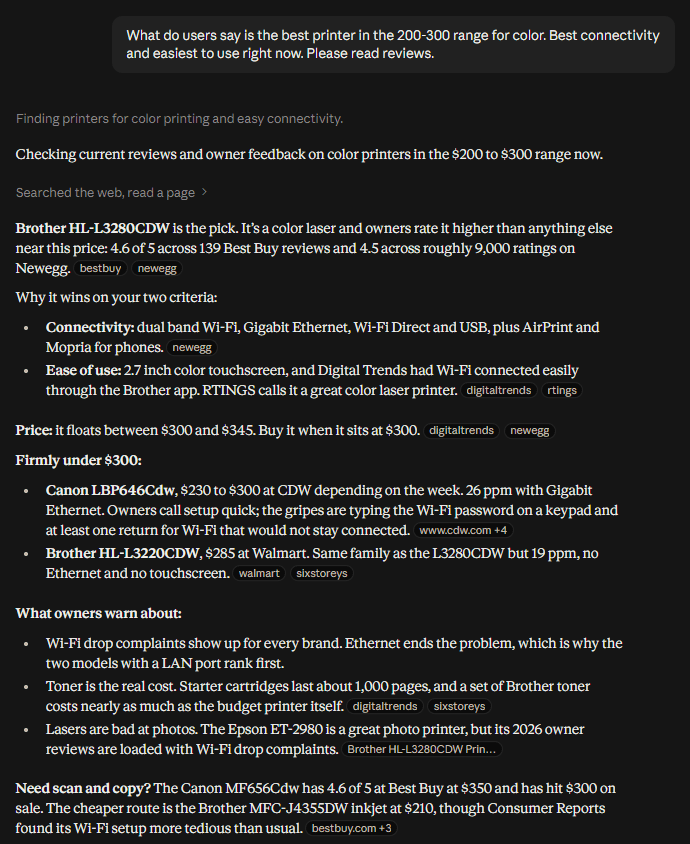
This is a real conversation. It started with one plain question about buying a printer. The assistant read owner reviews and compared prices, and it showed where every fact came from.
In a session you learn to ask questions like this one and to read the answers critically. You also learn to click the sources before you spend any money.
01 · What we cover
Six things I cover in a session
-
Your first conversation
I help you set up a free account and ask your first question, typed or spoken out loud. I'll also tell you which app to choose, in ordinary words.
-
Asking for what you want
You'll learn to ask so the answer is useful the first time. Say who it's for and how long it should be, and the tone you want.
-
Checking what it tells you
AI can sound completely sure and still be wrong. I show you how to spot that, and when to check a second source before you act.
-
Keeping private things private
I cover what should never go into a chat box, and the settings that stop your conversations from being kept or used for training.
-
Everyday jobs it does well
It writes letters and emails and summarizes long documents. It can also scale up a recipe or explain a photo of a confusing form.
-
Talking instead of typing
I show you voice mode on your phone, so you can ask out loud and hear the answer read back. It helps if small screens and keyboards are a struggle.
02 · Asking well
Four parts to a good request
Most disappointing answers come from a vague question. Say what you want, who it's for, how long it should be and the tone, and the first answer is usually the one you keep.
Write a birthday message for my granddaughter, who just turned 16. Keep it to three sentences and make it warm and a little funny.
03 · At home and at work
For everyday life
I start with the jobs you already do every week, so you save time right away.
For you and your family
- Letters, cards and emails that sound like you
- Explaining medical letters, bills and insurance paperwork in simple terms
- Planning trips, meals and family events
- Photos of a form or a gadget explained step by step
With family and friends
- Toasts, speeches and birthday messages
- Gift ideas and party planning
- Researching a big purchase before you buy
- Practicing a new language or hobby
Running a business? See AI business consulting.
04 · Staying safe
What's safe to type into the chat box
The same habits that keep you safe from scam emails keep you safe with AI. A voice on the phone that sounds just like a grandchild asking for money can now be faked, so I cover that too.
Good to ask
- A letter, an email or a card
- Explaining a bill, a manual or a form
- Recipes, trips and plans for the week
- Ideas, questions and practice conversations
Never type in
- Passwords and security codes
- Bank, card and Social Security numbers
- Medical records and test results
- Other people's private details
05 · How lessons work
How a session works
-
I start with a task you need done
I don't teach from a course. I use the letter you need to write or the question you've been putting off.
-
I sit beside you while you type
You work on your own phone or computer, so everything still works after I've left.
-
Notes in your inbox
Afterward I send a short email with the steps and a few requests worth saving.
06 · What it costs
$175 a session
It's the same price as every other service I offer. Each session runs up to two hours, and I don't charge a trip fee anywhere I cover.